CrazyGLCrazyGLHomeExploreGitHubBrowse heroesLoading hero…← Back to gallery@crazygl/wall-e

WALL-E

An animated 3D WALL-E that watches your cursor. His binocular head tracks the pointer with a soft, critically-damped spring — he idles, blinks, leans, and trundles a little on his treads to keep you in view, then perks up and bobs excitedly when you hover the call-to-action. Robot on the left, copy and CTA on the right. Premium, characterful, alive.

ReactWebGL3DInteractiveFont#3d#three#robot#wall-e#character#look-at#pointer#gltf#premium#cta

Usage

import WallE from '@crazygl/hero-wall-e';

<WallE
  heading="Meet WALL-E."
  subheading="He follows your every move."
  ctaLabel="Say hello"
  ctaHref="#"
/>;

Customise

  • Contentheading, subheading, ctaLabel, ctaHref.
  • InteractionlookStrength / lookDamping (how far and how snappily the head turns), driveAmount (how far he trundles toward the cursor), positionX / positionZ (his home spot), eyeTilt (mood roll of the binocular eyes).
  • Look & lightambientLight (overall fill / IBL / floor brightness — the low default reads dark and cinematic), bodyTint, keyIntensity / keyColor, rimIntensity / rimColor, floorContact (contact-shadow opacity), particleAmount (drifting dust density).
  • Backdroptransparent, backgroundTop, backgroundBottom.

Best for

  • Product launches and robotics / AI brands wanting a warm, characterful first impression.
  • Playful portfolios and app landing pages.
  • "Say hello" / contact moments where a living robot beats a static render.

Credits

3D model: "WALL-E(Animated)" by Janis Zeps (Zeps3D), licensed CC-BY-4.0. WALL-E is a character © Disney / Pixar; this model is fan-made — use accordingly.

01 · Install the package

One command, zero config.

npm install @crazygl/hero-wall-e
02 · Render the component

Import once, drop it in.

The component takes the same props you see in the live customizer on the right — every default ships poster-quality.

hero.tsx
import WALLE from '@crazygl/hero-wall-e';

export default function Landing() {
  return (
    <WALLE />
  );
}
03 · Use it in a page

SSR-safe by default.

The wrapper renders static HTML on the server and only initialises the canvas after hydration, so search engines see your copy.

page.tsx
// app/page.tsx — works in SSR-first frameworks (Next, Remix, Astro, etc.)
'use client';

import WALLE from '@crazygl/hero-wall-e';

export default function Page() {
  return (
    <section>
      <WALLE
        heading="Say hi."
        subheading="Your new hero."
      />
      <article>
        <h2>Welcome</h2>
        <p>Your content keeps its own voice below the hero.</p>
      </article>
    </section>
  );
}

You might also like

Similar heroes

Typographic 3D Transformer

A single extruded 3D word sits in the centre of the stage with a glassy candy finish under a RoomEnvironment studio. Move the cursor horizontally and the whole word rotates to face you; move vertically and each letter individually leans toward the cursor — closer letters bend more.

Magnetic Dot Cloud

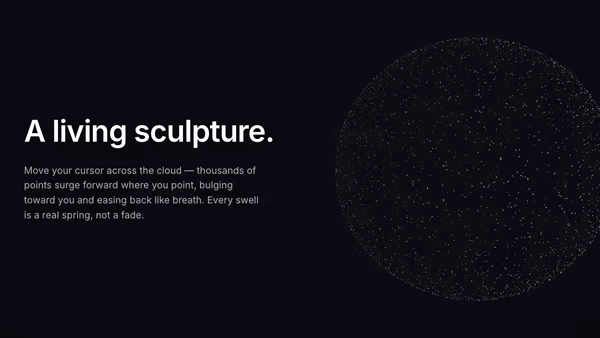
Thousands of floating 3D points settle into a soft sphere of light. Wherever you point, a gravity well opens — nearby dots erupt radially outward from the sphere's centre, bulging the cloud like a living particle sculpture. A critically-damped spring eases every swell in and out; idle, the whole field drifts and turns.

Sculpted Light Bust

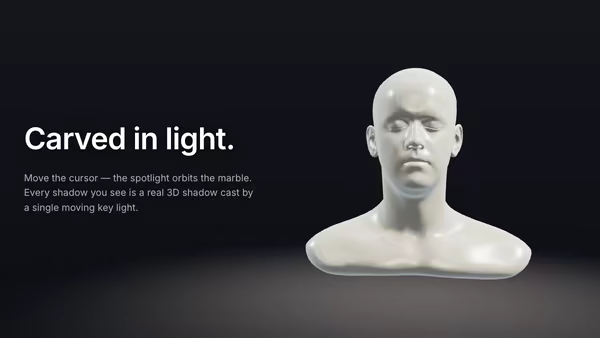
A polished marble sculpture under studio lighting. The pointer orbits a single bright key light around the bust in real 3D, raking it across the stone face for hot specular highlights, cool subsurface shadows in the recesses, and a warm rim that tracks the cursor like a real museum spotlight.

Data Rain 3D

Characters, digits and small symbols fall through a real 3D perspective volume. Near glyphs are large and bright, far ones shrink and dissolve into depth fog. Move the cursor and the falling stream curves around it, like rain hitting an invisible umbrella.

Energy Beam CTA

A conversion-focused hero: the main CTA button emits a glowing vertical beam that connects to a tilted product dashboard, making the button feel like it activates the product. Hover the CTA to brighten the beam, burst particles, and ripple a wake across the dashboard.

Frosted CTA Panel

Your product screenshot drifts softly behind a frosted glass panel that holds the heading copy. Real transmission frost in the body, a sharp dispersive rim, two drifting light leaks, and layered parallax that separates the panel from the screenshot.
Live customizer

WALL-E

Look strength1How far WALL-E turns his head to track the cursor. 0 = stares ahead; 1 = follows fully; above 1 exaggerates the turn.Look smoothing6Spring stiffness of the head follow. Low = heavy, lazy turns; high = snappy, alert tracking. The motion is always eased — never a jump.Trundle0.5How far WALL-E drives toward the cursor on his treads — he turns to face where he's going and rolls forward (no sideways sliding). 0 = stays put; 1 = ranges across his patch. Always bounded to a small area.Position X-1.84Moves WALL-E's home spot left (−) or right (+) across the floor. His bounded trundle patch stays centred on this anchor, so he always wanders around — and returns to — wherever you place him.Position depth0Moves WALL-E's home spot toward the camera (−) or deeper into the scene (+). His bounded trundle patch stays centred on this anchor.Eye expression0.06Rolls WALL-E's binocular eyes about their axis to set his mood — tilt one way for curious/quizzical, the other for happy/sad. 0 = level. Composes on top of the cursor look-at.Ambient light0.1Overall fill / ambient brightness. Drives the soft hemisphere light, the fill/bounce, the image-based reflection strength AND the floor pad — all tied together, so the low default reads genuinely dark and moody, and pushing it up opens the whole scene into an airy, evenly-lit look.Body tintMultiplies WALL-E's worn-paint colour. Keep near white to preserve the original look; nudge warm/cool to match a palette.Key light0.95Key colourRim light1.1Rim colourFloor shadow0.29Opacity of the soft contact shadow WALL-E casts on the dim studio floor beneath him.Dust density0.79How many soft, drifting dust motes float in the air around WALL-E (and how chunky they read). 0 = none; 1 = a thick, atmospheric haze. Gently fades with depth; disabled when reduced-motion is on.Transparent backgroundDrop the backdrop (and the light studio floor pad) so WALL-E and his contact shadow composite over whatever sits behind the hero.Backdrop topBackdrop bottomInteractivityWhich input drives the hero — try Scroll if you want the page to drive motion.
CrazyGL · crazygl.comProgrammable hero sections for real websites.