CrazyGL
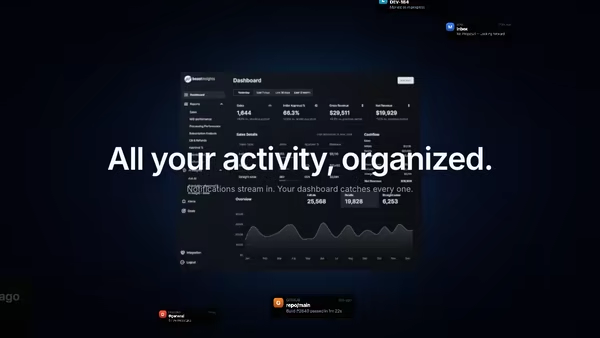
Screenshot with Animated Data Flow
Glowing particles and connection lines stream out from a tilted product screenshot, suggesting live data moving through the UI. Built for analytics, CRM, automation, AI agents and database products.
Usage
import DataFlow from '@crazygl/hero-data-flow';

export default function Hero() {
	return (
		<DataFlow
			screenshot="/img/dashboard.avif"
			particleColor="#56e3ff"
			accentColor="#ffb45a"
			flowSpeed={0.7}
		/>
	);
}
Customise
- Screenshot —
screenshot(the centerpiece capture), plusscreenAspect,screenScale,screenTilt,screenBrightness,screenshotX/Yto frame it. - Flow —
particleCount,particleColor,accentColor,flowSpeed,particleSize,emissionRate. - Lines —
showLines,lineOpacity,lineMaxDistance(how far a particle drifts before its tether fades). - Cursor —
cursorAttractbends the stream toward the pointer;cursorBurstspawns extra particles near the cursor. - Background —
bgTop/bgBottomgradient,ambientStarsdepth layer;contentAlignfor the copy.
Best for
- Analytics, BI, and customer-data (CRM) platforms.
- AI agent products and real-time / automation tools.
- Database and infra startups where "live data moving through the product" is the pitch.
One command, zero config.
npm install @crazygl/hero-data-flowImport once, drop it in.
The component takes the same props you see in the live customizer on the right — every default ships poster-quality.
import ScreenshotWithAnimatedDataFlow from '@crazygl/hero-data-flow';

export default function Landing() {
  return (
    <ScreenshotWithAnimatedDataFlow />
  );
}SSR-safe by default.
The wrapper renders static HTML on the server and only initialises the canvas after hydration, so search engines see your copy.
// app/page.tsx — works in SSR-first frameworks (Next, Remix, Astro, etc.)
'use client';

import ScreenshotWithAnimatedDataFlow from '@crazygl/hero-data-flow';

export default function Page() {
  return (
    <section>
      <ScreenshotWithAnimatedDataFlow
        heading="Say hi."
        subheading="Your new hero."
      />
      <article>
        <h2>Welcome</h2>
        <p>Your content keeps its own voice below the hero.</p>
      </article>
    </section>
  );
}