CrazyGLCrazyGLHomeExploreGitHubBrowse heroesLoading hero…← Back to gallery@crazygl/typography-as-terrain

Typography as Terrain

A bold headline is rasterised into a heightmap and extruded into a 3D landscape — the letters rise out of the ground as carved plateaus and ridges, lit by a low sun with drifting cloud shadows and atmospheric haze. A fixed aerial-oblique camera keeps the word readable, and the pointer orbits the terrain for parallax.

ReactWebGL3DInteractiveFont#typography#terrain#heightmap#three#landscape#experimental#agency#portfolio#shader

Usage

import TypographyAsTerrain from '@crazygl/hero-typography-as-terrain';

export default function Hero() {
  return (
    <TypographyAsTerrain
      heading="HORIZONS"
      extrudeHeight={0.54}
      cameraElevation={40}
    />
  );
}

The terrain is built entirely from the word you type — no separate texture or art to supply — and honours your selected heading font and weight.

Customise

  • Contentheading (ALL-CAPS, 5–10 chars reads best), subheading, ctaLabel, onCTAClick (URL or function).
  • TerrainextrudeHeight, heightmapBlur (edge softness), duneBaseSpread (dune skirt width), terrainSize, and base-hill baseTerrainAmplitude/Scale/Octaves.
  • CameracameraElevation, cameraAzimuth, cameraDistance, parallaxStrength.
  • MateriallowColor, midColor, highColor (elevation bands).
  • LightingsunAngleX/Y, sunIntensity, fogColor, fogDensity, ambientMotion.
  • TypographyheadingFontFamily, headingFontWeight.

Best for

  • Creative studios and design agencies.
  • Portfolio, "about", and editorial headers carried by one confident word.
  • Conference and festival landing pages.
01 · Install the package

One command, zero config.

npm install @crazygl/hero-typography-as-terrain
02 · Render the component

Import once, drop it in.

The component takes the same props you see in the live customizer on the right — every default ships poster-quality.

hero.tsx
import TypographyAsTerrain from '@crazygl/hero-typography-as-terrain';

export default function Landing() {
  return (
    <TypographyAsTerrain />
  );
}
03 · Use it in a page

SSR-safe by default.

The wrapper renders static HTML on the server and only initialises the canvas after hydration, so search engines see your copy.

page.tsx
// app/page.tsx — works in SSR-first frameworks (Next, Remix, Astro, etc.)
'use client';

import TypographyAsTerrain from '@crazygl/hero-typography-as-terrain';

export default function Page() {
  return (
    <section>
      <TypographyAsTerrain
        heading="Say hi."
        subheading="Your new hero."
      />
      <article>
        <h2>Welcome</h2>
        <p>Your content keeps its own voice below the hero.</p>
      </article>
    </section>
  );
}
You might also like

Similar heroes

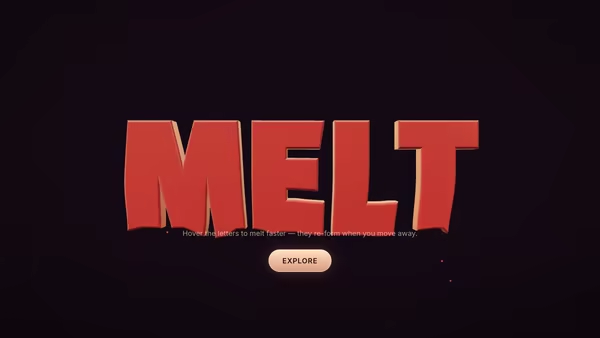
Melting Typography

Headline cast in soft wax that drips slowly downward — vertices stretch into icicle-like extensions while letters stay readable. Hovering speeds up the melt; moving away lets the letters re-form. Glossy droplets fall from the bottoms.

Kinetic Split Typography

A bold grotesk headline is split into horizontal slices that fly in from alternating sides, settle into alignment, and then parallax against the pointer at different depths.

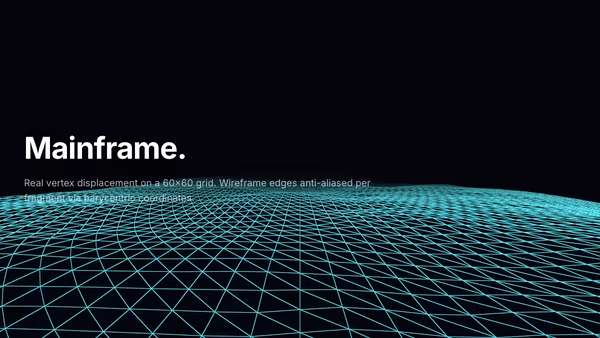
Holographic Terrain

Low-poly wireframe terrain stretching to the horizon. Real vertex displacement (no faked depth), barycentric wireframe AA, distance fog, height-driven emissive on the peaks. Camera scrolls forward.

Liquid Metal Typography

Heavy 3D headline rendered as molten chrome — letters wobble with FBM noise while staying readable, pointer creates localized ripples on the surface, and clicking triggers a quick splash wavefront. Floats over an image or video backdrop with a user-selectable HDRI driving the reflections.

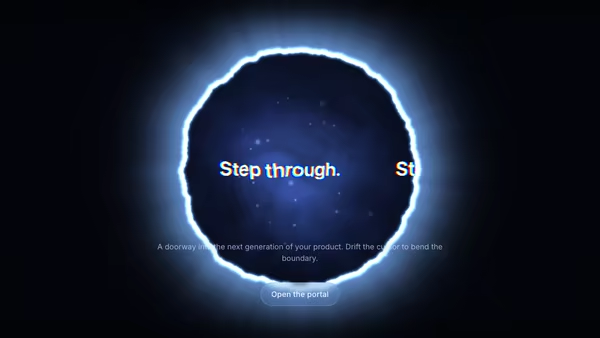
Typography In Portal

Your headline rendered inside a glowing circular portal — text drifts across the opening, the rim glows and ripples with noise, and the pointer bends the portal in real time. Built as a single fullscreen WebGL shader that samples a canvas-rendered text texture with chromatic aberration.

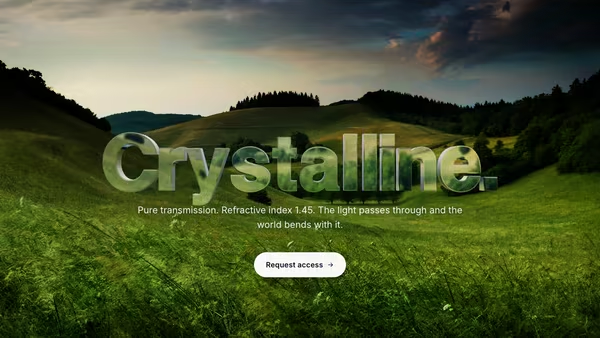
Glass Typography

A headline cast in transparent optical glass: Three.js TextGeometry extruded into a real 3D object, rendered with MeshPhysicalMaterial (transmission, IOR, dispersion, clearcoat) so it visibly refracts the moving gradient behind it. Pointer parallax tilts the camera and CTA hover sweeps a bright edge highlight across the letters.
Live customizer

Typography as Terrain

Extrude height0.54How tall the letters rise above the ground. Below 0.4 reads flat; above 2.2 starts to break legibility.Heightmap blur1pxSoftens the sharp letter edges into ridges. 0 = razor-crisp glyph outlines (combine with dune base spread = 0 for crystal-sharp letters), 3–6 = natural ridges, 12+ = abstract dunes. This only affects the EDGE softness; the WIDTH of each dune's base is controlled by 'Dune base spread'.Dune base spread0.48How wide each letter-dune's base spreads outward from the glyph. 0 = tight steep slopes that hug the glyph outline; 1 = broad cushioned skirts that bleed into roughly a quarter of the typography window; 1.5 = a wide halo that almost fills the typography window. Changing this re-bakes the heightmap (visible after a brief pause).Terrain extent110worldOverall extent of the surrounding land plane. Larger values push the horizon further away for a more 'infinite' feel; the fog/sky blends the far edge.Hills amplitude0.75worldHeight of the rolling hills/dunes that surround the typography. 0 disables the base terrain; 0.3–0.8 reads as gentle land; 1.5+ is dramatic ridges.Hills frequency1Frequency of the base terrain noise. Low = wide rolling hills, high = sharp tight ridges.Hills detail4Fractal detail count for the base terrain. 1 = smooth dunes, 3 = natural hills, 5 = jagged ridges with fine detail.Camera elevation40°How steeply the camera looks down on the terrain. ~30–45° reads the word clearly while keeping depth; 70°+ is near top-down.Camera azimuth12°Which side the camera views from. A small offset gives the letters dimensional shadow without distorting the word.Camera distance21Distance from the word. Lower fills the frame; higher leaves more sky and haze.Parallax strength0.5How far the pointer orbits the camera around the terrain. 0 disables parallax.Ground colorColor at the base of the terrain — soil / valley floor.Mid colorColor along the slopes of the letters.Peak colorColor at the highest points — sunlit stone, sand, or snow.Sun elevation32°Sun height above the horizon. Low values cast long dramatic shadows; high values flatten the relief.Sun azimuth135°Compass direction of the sun. Rotates which side of each letter catches the light.Sun intensity1.55Strength of the directional light. 1.2–1.8 is the photographic sweet spot.Fog colorColor of atmospheric haze. Picks up the dominant time-of-day cast.Fog density0.55How quickly far terrain dissolves into haze. 0.4–0.7 gives a deep landscape; above 0.8 washes out.Ambient motionSlow drifting cloud shadows and a gentle sun sway. Off (or under reduced motion) freezes the scene.Heading FontFont rasterised into the heightmap AND used for the DOM heading. 'Inherit' uses a bundled heavy display face for the showcase frame.Heading weight900Weight used when rasterising the headline. Heavier = bolder, more solid ridges.InteractivityWhich input drives the hero — try Scroll if you want the page to drive motion.
CrazyGL · crazygl.comProgrammable hero sections for real websites.