CrazyGLCrazyGLHomeExploreGitHubBrowse heroesLoading hero…← Back to gallery@crazygl/paper-shadow-hero

Paper and Shadow

Your product screenshot, printed on a softly curled sheet of paper resting under warm window light. Leaves drift overhead and cast slow, dappled shadows across the page.

ReactWebGL3DImageInteractiveFont#3d#paper#shadow#wellness#writing#education#three#screenshot#calm#tactile

Usage

import PaperShadowHero from '@crazygl/hero-paper-shadow-hero';

export default function Hero() {
  return (
    <PaperShadowHero
      heading="Made to be read slowly."
      subheading="A quieter writing space."
      screenshot="/your-app-screenshot.png"
    />
  );
}

Customise

  • Screenshotscreenshot image; the paper sheet derives its aspect from the image so nothing stretches.
  • PaperpaperScale, paperX/paperY, paperRotation, paperTilt, paperCurl (bottom-edge lift), paperFlow (breeze ripple), paperFlowSpeed.
  • Light & shadowwindowLightWarmth, lightIntensity (master), keyLightIntensity, fillLightIntensity, lightAngleX (elevation), lightAngleY (azimuth), shadowSoftness, dustCount.
  • CamerapointerParallax (capped ±2° at 1).
  • BackgroundtransparentBackground, bgColor (cream wall).

Best for

  • Writing, journaling and reading apps with an unhurried voice.
  • Wellness, meditation, sleep and slow-tech products.
  • Education and online-course platforms.
  • Creative tools that want paper-on-a-desk warmth over a glossy SaaS frame.
01 · Install the package

One command, zero config.

npm install @crazygl/hero-paper-shadow-hero
02 · Render the component

Import once, drop it in.

The component takes the same props you see in the live customizer on the right — every default ships poster-quality.

hero.tsx
import PaperAndShadow from '@crazygl/hero-paper-shadow-hero';

export default function Landing() {
  return (
    <PaperAndShadow />
  );
}
03 · Use it in a page

SSR-safe by default.

The wrapper renders static HTML on the server and only initialises the canvas after hydration, so search engines see your copy.

page.tsx
// app/page.tsx — works in SSR-first frameworks (Next, Remix, Astro, etc.)
'use client';

import PaperAndShadow from '@crazygl/hero-paper-shadow-hero';

export default function Page() {
  return (
    <section>
      <PaperAndShadow
        heading="Say hi."
        subheading="Your new hero."
      />
      <article>
        <h2>Welcome</h2>
        <p>Your content keeps its own voice below the hero.</p>
      </article>
    </section>
  );
}


You might also like

Similar heroes

Calm Cloud Interface

A SaaS dashboard floats among soft cloud sprites under a friendly cream-to-sky-blue sky. Pointer drift parallaxes both the camera and the layered clouds for a light, approachable, effortless mood.

Breathing Gradient Landscape

A product screenshot floats above an abstract gradient terrain that slowly breathes through stacked low-frequency FBM noise. Warm peach peaks fade into soft sage valleys; motes drift up; the camera pans across a 30-second loop with a hint of bob.

Cursor Shadow Text

The heading casts a real drop shadow whose direction tracks the cursor — like a single fixed light moving across the room.

Long Shadow Text

Pure CSS long-shadow heading — letters cast a diagonal ramp shadow that gradient-fades into the bg, like classic flat-design posters.

Floating Ceramic UI

A matte ceramic-like tablet panel with rounded edges presents your dashboard screenshot under soft studio lighting. The slab breathes through a slow yaw oscillation with subtle pointer-driven tilt; ambient occlusion sells the screen-to-bezel seam.

Product UI in Zero Gravity

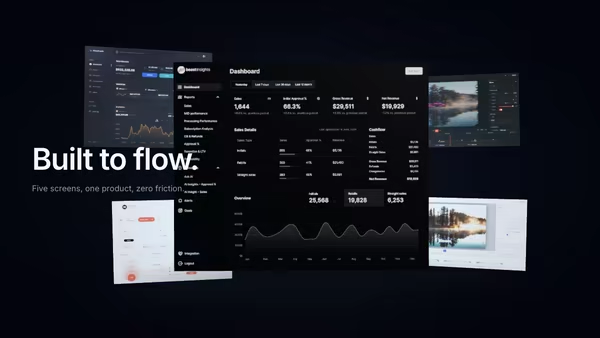
Five product screens drift weightlessly in a dark space. The main screen sits in focus at the front; four secondary feature screens float at varying depths behind it, with soft shadows and depth fog selling the void.
Live customizer

Paper and Shadow

ScreenshotAny dashboard / app PNG, JPG, WebP, or AVIF. The paper sheet derives its aspect from the loaded image so nothing gets stretched, and the screenshot always covers the full paper surface.Paper size0.84Overall size of the paper sheet in the frame. The screenshot scales with it.Paper offset X0worldNudges the paper horizontally in world space. 0 is centred.Paper offset Y0worldNudges the paper vertically in world space. 0 is centred.Paper rotation0°Rotates the paper around its viewing axis (Z). 0 sits perfectly upright.Paper tilt-18.5°Tilt of the paper sheet around its X axis. Negative angles tip the top toward the camera.Paper curl1.88How much the bottom edge of the paper lifts off the desk. 0 = perfectly flat; 1 = strongly curled; 2 = pronounced roll.Paper flow1Subtle waviness in the paper, as if a gentle breeze is moving across it. 0 = perfectly still; 1 = noticeable ripple.Paper flow speed2Speed of the paper's waving motion. 0 freezes the flow, 2 doubles the breeze.Window lightColour of the warm directional light streaming in from the upper-left, like a low afternoon window.Overall light intensity1.84Master multiplier on key, fill, and ambient lights. 0 plunges the scene into darkness; 1 is the studio default; 3 floods everything.Key light intensity3Strength of the directional 'window' light. 0 leaves only the fill; 3 is the punchy default; 8 floods the scene.Fill light intensity2Hemisphere fill that models warm bounce off the room. Raises shadow brightness without altering the key direction.Key light elevation0°Elevation of the key light above the desk plane. 0 rakes across the paper; 90° is straight overhead; negative shoots from below.Key light azimuth-78°Horizontal angle of the key light. Negative swings it to the left of the camera; positive to the right.Shadow softness0.7How diffuse the shadow is on the paper. 0 = crisp midday; 1 = barely-there.Dust particles40Number of slow-drifting dust motes catching the window light.Pointer parallax1How much the camera tilts in response to the cursor. 1 = ±2°; 4 = ±8°.Transparent backgroundDrop the cream wall so the paper composites cleanly over your page background.Wall colourWarm cream / off-white wall colour behind the paper. The wall picks up a subtle vignette automatically.Heading FontInteractivityWhich input drives the hero — try Scroll if you want the page to drive motion.
CrazyGL · crazygl.comProgrammable hero sections for real websites.